Agent Chat

runs on your machineany OpenAI-compatible serverLinux + macOSMIT

Agents on your own model.Watch every step.

Agent Chat is a chat app for agents that run against your own model server, such as llama-server. Each agent has its own job and tools, agents hand work to each other, and every step shows up as a live trace. Open it in the terminal with agent-chat, or in the browser.

curl -fsSL https://agent-chat-i4sv.onrender.com/install.sh | bash

Installs for your user under ~/.local, no sudo. Run it again to update; your chats stay. Read the script before you run it.

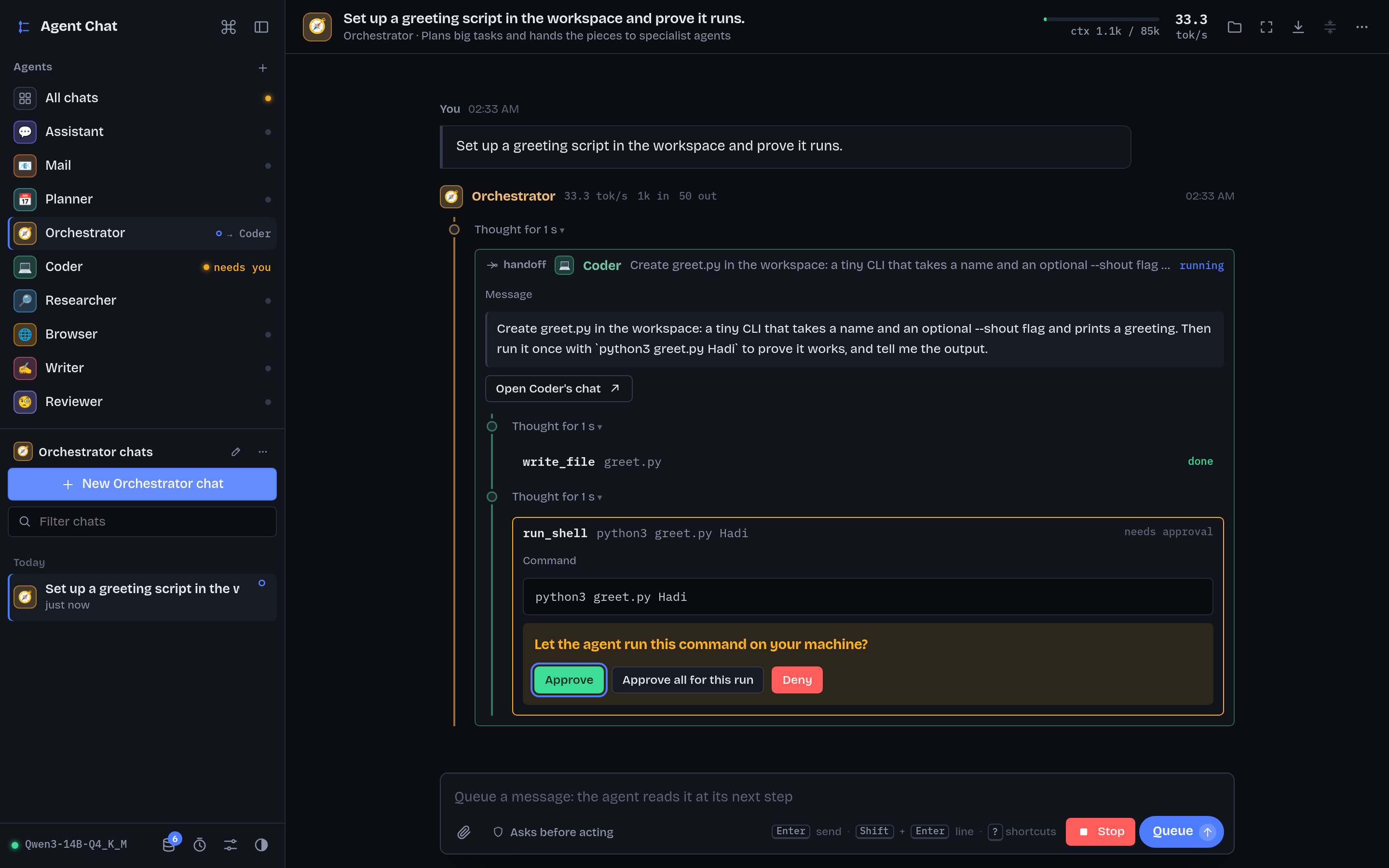
The Agent Chat web UI: the Orchestrator has handed a task to the Coder, which wrote greet.py and is waiting for approval to run a shell command.
The web UI: the Orchestrator hands a task to the Coder, whose shell command waits for your approval.

Three steps

From a fresh machine to a chat with an agent.

  1. 1Install

    curl -fsSL https://agent-chat-i4sv.onrender.com/install.sh | bash

    Downloads the app and the terminal client (checked against the SHA-256 published with the release), installs uv if it's missing, and sets up the Python environment so the first start is quick.

  2. 2Start your model server

    llama-server -m your-model.gguf --jinja

    Agent Chat never starts the model for you. --jinja turns on tool calling. It looks for http://127.0.0.1:8080/v1; for Ollama, LM Studio, vLLM or another port, set the address in Settings.

  3. 3Run it

    agent-chat

    Starts the app in the background if it isn't running, then opens the terminal client. agent-chat web opens the same app in your browser at http://127.0.0.1:8765.

What you get

The same features in the terminal client and the web UI. Chats, agents, memory and settings stay on your machine.

ask_agent → Coder

Agents with their own tools

Nine to start with: Assistant, Mail, Planner, Orchestrator, Coder, Researcher, Browser, Writer and Reviewer. Each has its own instructions, tools (files, shell, web search, a real browser, email, calendars) and optionally its own model. Any agent can hand a task to another, and that work opens as its own chat.

thinking · tool call · answer

Live traces

Every reply is a trace: thinking, tool calls, handoffs and the answer, streamed as they happen. Shell output scrolls in while the command runs; a file being written appears line by line.

subagent · Part 1, Part 2

Subagents

An agent can hand parts of a job to copies of itself, each with a fresh context. They search, read and work through their part, and only their reports come back, so the agent's own context stays small.

mcpServers · find_tools

MCP servers

Paste a server's config in the shape its README gives for Claude Desktop and tick it for an agent. Big catalogs are searched instead of listed, so 170 tools don't fill a small model's context.

needs approval

Approvals

Shell commands and outgoing email wait for you: Approve, Approve all for this run, or Deny. Letting agents act without asking is a switch you turn on yourself.

remember · recall_memory

Memory

Agents share a memory of facts about you. It grows as you chat, the most relevant facts come along with each message, and you can read, edit or delete any of them.

weekdays 07:30 · Mail

Routines

Run an agent on a schedule: a morning email briefing, tomorrow's plan, a news digest. Each routine has its own chat, so you can read every run and reply to it.

agent-chat · agent-chat web

Terminal client and web UI

A terminal client written in Rust, and a browser UI. Both talk to the same app, so a chat started in one shows up live in the other, approvals included.

/compact keep the decisions

Slash commands

Type / in the message box: /new, /resume, /compact, /model, /branch, /export and more. Ctrl+K finds any chat by what was said in it.

ctx 61k / 85k

Long chats keep going

Old tool output is cleared first, and before a chat runs out of context older messages are summarized, so the agent carries on. The header shows how much of the model's context is in use.
In the terminal and the browser

Screenshots from the repository.

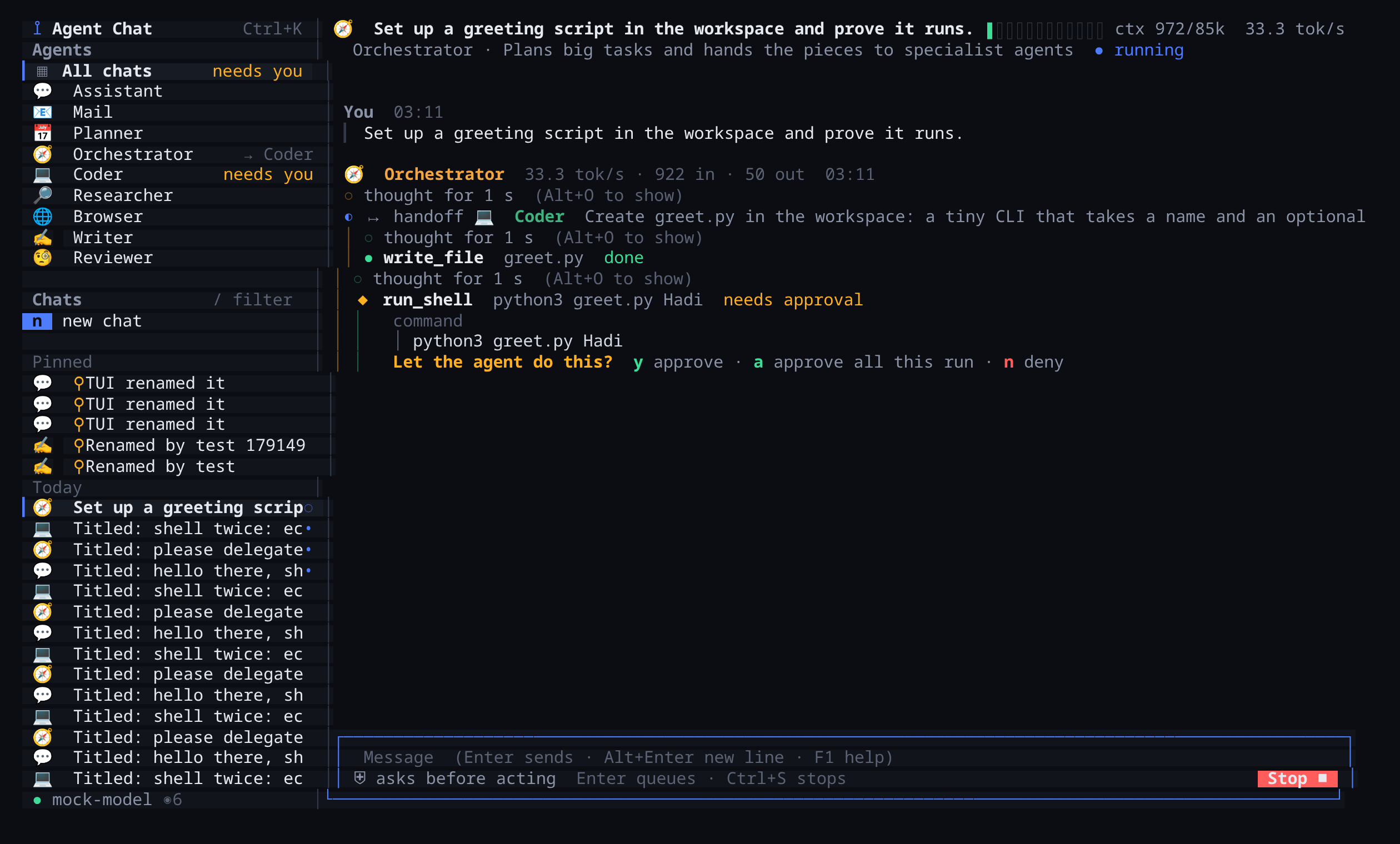
The terminal client showing the same handoff from the Orchestrator to the Coder, with an approval prompt: y approve, a approve all this run, n deny.
The terminal client (agent-chat): the same handoff, approval included.
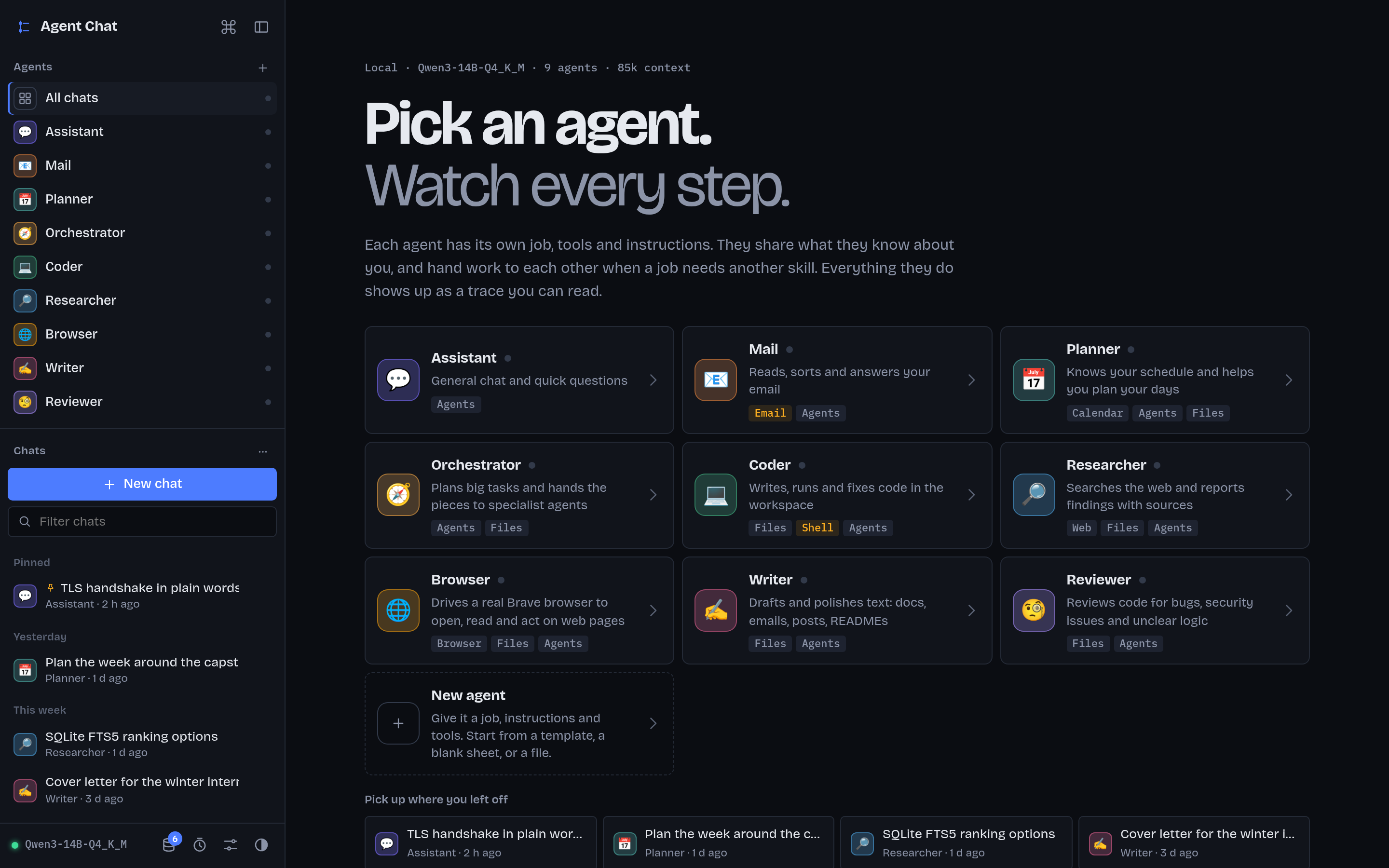
The web UI's start page: nine agent cards with their tools, and recent chats.
The start page in the web UI (agent-chat web): pick an agent.

Usage

One command, like claude or git. The app keeps running in the background after you quit the client, so routines fire on time.

agent-chat
Open the terminal client, starting the app first if needed. Takes --light, --plain, --chat ID.
agent-chat web
Open the web UI in your browser and print its address.
agent-chat status
Whether the app is up, whether it can reach your model server, and where your data lives.
agent-chat stop | start | restart
Control the background app. stop only stops one that agent-chat started.
agent-chat logs [-f]
The app's log, or follow it.
agent-chat update
Install the latest release in place. Chats, agents, memory, settings and the workspace stay.
agent-chat uninstall [--purge]
Remove the app and keep your data, or delete the data too with --purge. Asks first; -y skips that.

Read the script first

It's a plain bash script. Download it and read it:

curl -fsSL https://agent-chat-i4sv.onrender.com/install.sh -o install.sh less install.sh

Then, if you're happy with it, run it:

bash install.sh

Environment variables change what it does: AGENT_CHAT_VERSION=0.3.4 installs that release, AGENT_CHAT_NO_TUI=1 skips the terminal client, AGENT_CHAT_HOME (a folder for Agent Chat alone) and AGENT_CHAT_BIN move the install. Run it as yourself, not with sudo. With | bash, put them after the pipe: … | AGENT_CHAT_NO_TUI=1 bash.

Where things go

~/.local/share/agent-chat/app
The app. Replaced as a whole on every update.
~/.local/share/agent-chat/data
Your chats, agents, memory and settings. Updates never touch it.
~/.local/share/agent-chat/workspace
The folder the agents' file and shell tools work in.
~/.local/bin/agent-chat
The launcher, next to agent-chat-tui, the terminal client.
~/.local/state/agent-chat
The background app's log and pid file.

Requirements